How many times have you thought about (or even started) building a niche website with dreams of making thousands of dollars in passive income each month?
If you’re like most people trying to make a living on the internet, the thought has probably crossed your mind at least once, if not thousands of times.
For me, this idea of the niche site is one of the most fascinating anomalies on the internet. It’s one of the hardest, yet stupidly easy things you can do online.
The steps to building a successful site that pulls in at least $500 a month are extremely straight forward, yet most people come at it from an angle of trying to game the system – they’ve lost before they even reached the starting line.
Sure, there are people out there who make hundreds of thousands of dollars off crappy niche sites and products – but most of them have some serious technical, spam, and SEO skills that let’s face it, we don’t have.
So we’ve gotta come up with a better way, you know, one that actually helps people.
Niche Site Quick Start
This is the longest post I’ve written in a year. I go into detail about what to do and why to do it. Don’t have time for that? Here’s the 14 step, quick start, Cliff’s Notes version of my strategy for building a niche site. If you have questions about something, then quit being lazy and read the rest of the article.
Still have questions? Leave a comment.
Step #1: Write out as many niche site ideas as you can, using your interests as a starting point.
Step #2: Narrow down niche based on the following criteria:
- Wide array of products you can review and discuss
- Higher price, lower volume
- Are there affiliate programs with good commissions?
- Are people currently making money?
- Could you write 100 articles on the topic?
Step #4: Start creating content. Here’s a good outline to get you going:
- Write 5 articles reviewing 5 of the most popular items in your niche
- Write 3 in depth tutorials on your niche (How to _______)
- Write 3 list posts
- Repeat
Step #5: Sign up for affiliate programs relating to your niche
Step #6: Do keyword research to find 5-10 of the best key terms/products to try and rank for
Step #8: Create a list of friends and colleagues to email and tell about your new site
Step #9: Setup social media for the site: Facebook, Twitter, and Pinterest
Step #10: Sign up for HARO
Step #11: Make a list of all large blogs and syndicated publications you’d want to be featured on
Step #12: Start contacting previously listed blogs and websites offering guest posts or story ideas (here’s how to do it)
Step #13: Create a high quality pdf or email series to collect email addresses. Add to site.
Step #14: Repeat Steps 4 and 12, while continuing to build your social media channels and links for SEO.
There you have it, 14 steps to a niche site that will make you at least $500/month. Want to actually learn how to do this? Then keep reading.
My First and Only Niche Site
Ok in this for the long haul? Cool, grab some coffee or a beer and let’s get going with this.
About two years ago a friend of mine and I started a niche site called
HDR Software.
For those of you who don’t know HDR (High Dynamic Range) photography is a process where you take 3 versions of the exact same photograph where one is over-exposed, one is under-exposed, and one is taken at normal exposure.
The software then allows you to combine these images to take one perfectly exposed image.
Here’s an example:
I’d already had a site based around this process, so it was a natural fit to jump into this market.
For the first year we did very little paid SEO, wrote all of our own content, and really didn’t spend that much time working on it. Within 6 months the site was making over $1k a month. At it’s peak it was making closer to $3k/month.
Things were great.
We provided unbiased reviews of software, along with tips for HDR success, and were making good money in the process.
That’s when we started making mistakes.
We hired out two different SEO companies to do some link building for us – believing them when they said it was all hand built, non-spammy links.
A month into working with both of them, we couldn’t believe what we were seeing when we looked at our link profiles – nothing but spam.
We canceled the accounts immediately – but the damage was done.
The site still brings in about $1k/month and I’ve had a renewed goal of getting it back to it’s former glory.
However the point of me telling you this is I know what works, and what doesn’t – both through my own experience, as well as that of close friends who have seen spectacular success, catastrophic failures, and many who just saw a whole lot of nothing when it comes to niche affiliate websites.
Today, I’m going to share with you, exactly how to build a successful niche affiliate website. More importantly, we’re going to do it in a way that would make your mom proud.
Crash Course: How Do You Make Money Through a Niche Site
Just to make sure we’re all on the same page, let’s talk real briefly about how we’re actually going to make money through this site.
There are a lot of ways to make money on the internet, a few of the ones you’ll find on niche sites are:
- Affiliate Links
- Adsense Ads
- Other Paid Advertisements
- Paid Text Links
- Direct product sales
However for the purposes of this post, we’re solely going to focus on affiliate marketing.
What’s that you might be wondering? Glad you asked.
Here’s the process in the simplest terms possible:
- You have a website
- Someone else has a product
- You get a special link to their product
- A reader clicks on the link and buys the product
- You get a commission
Simple as that!
However for as simple as it sounds, actually getting traffic and getting people to buy products is a much more difficult task that we’ll be covering in depth in this article.
Now that we’re on the same page though, lets jump into exactly how to select a niche, and more importantly how we’re going to select the specific products we’re going to promote.
How to Find and Test a Niche
I believe you can build a niche website around just about anything, assuming you’re passionate enough about the topic.
The reason most people fail is because they choose a niche like “Swedish leather furniture” when they are nomadic and have absolutely no interest in what they’re writing about.
If you want to do this successfully, basically think of this new site like a blog. A blog where you have to write a LOT about one particular topic, and the content has to be really good.
If you don’t have a certain level of knowledge or interest in that topic, you’re going to get burnt out before you even make your first dollar.
This is why niche selection is so important.
Action Item: Write out a list of every product, hobby, or interest you have that you might be able to build a site around.
Why? Because everyone always says they don’t have a good idea. I’m willing to bet if you get a list of 50-100 possible niches you’ll be in good shape. Need a jumpstart, here are some from my brainstorm list:
Tennis ball machines, Islay scotch, DSLR cameras, golf balls, golf clubs, golf shoes, really anything golf, skis, tripods, SE Asia travel, travel credit cards, luxury watches, televisions, hi fidelity speakers, AV receivers, Mac computers, 5 star hotels, video editing software, waterproof cameras, travel backpacks, headphones etc etc etc.
I could go on like that forever, as I’m sure you could too if you start thinking about it.
Now, with enough time, motivation, and passion, I think you could probably build a successful niche site out of just about any one of those niches I listed.
But we don’t have all the time in the world, so we want to make sure we give ourselves the best shot at success possible.
How are we going to do that? By running our list of niches through a few key filters.
Action Item: Narrow down niche based on the following criteria:
High Price, Low Volume
I’d rather make a bunch of money off one sale, than a little money off a lot of sales. This holds more true for e-commerce/dropshipping websites – but I look at it like this: if I have a low priced product I have to get maybe 5 or 10 times as many people to actually whip out their credit cards and buy something, but if I only have to convince one person to make a good commission – it’ll be easier to make money over the long term.
Could I write 100 articles about the topic?
My strategy is all about creating incredibly useful, shareable content – so if I can’t see myself writing 100 unique articles over the next couple years then there’s a good chance I’m not interested in it enough to invest the time and energy into the project. Don’t get me wrong, maybe you’ll be able to, but for me, this one’s a deal breaker.
Note: If you have some money to invest, you can hire this out as long as you’re diligent about the quality.
Are there affiliate programs (with good commissions)?
There are affiliate programs out there that will allow you to sell just about anything. The question is, what are the commissions like? The whole “high price, low volume” doesn’t work if you still only get a 1% commission off the sale. I generally won’t get into any market with less than a 10% affiliate commission unless I have a really good reason. I also shoot for at least 25-30% with everything I do.
It’s worth noting you generally won’t find commissions this high with physical products, but if you have a few good products that you can recommend with higher commissions, it can help subsidize the rest of the products that may have lower commissions.
Are there currently people making money?
This can be a tough question to answer definitively, but here’s how I go about it.
Come up with 5-10 keywords that people might search for when looking for your product.
Let’s say it’s DSLR cameras, in particular let’s use the Nikon D7000 as our example.
I might search for: Nikon D7000 review, Nikon D7000 sale, adorama coupon code (a site that sells the camera), Nikon D7000 vs. D600.
I’ll then run those through the
Google Keyword Tool or
Market Samurai to see how much traffic they each get. In this case, “Nikon D7000 Review” gets 27,100 searches per month.
Note: Doing this will also provide you with a hundred other keywords that may be more attractive.
When I do a search for that (and all these other keywords), one site continually pops up:
Kenrockwell.com
This just so happens to be one of my favorite photography sites – where all he does is review Nikon camera equipment.
Is he making money off the site? Yep. He even tells us he is at the bottom of every page. Moreover, he says the site makes him enough for him and his family to live off of.
This is the perfect example of an affiliate site done well.
But, that’s just one guy. Are other people making money?
Looking through some of the pages on the search results, there are other reviews with affiliate links in them, so I’ve gotta imagine that because there are so many people in this market reviewing this particular product, that people are making some decent money (especially if they are reviewing a bunch of other cameras and equipment as well).
Here’s my basic formula for determining if it’s a profitable niche:
Buying Keyterm Traffic + Lots of reviews with affiliate links + High priced product with good affiliate commissions = Good chance people are making money.
There are much more scientific and in depth ways you can research this, but if you’re just starting out this can help you get a good idea.
Why I Personally Wouldn’t Build a Site Around Amazon
Before we start jumping into the specifics of getting your site setup, we should address one thing: Amazon.
Amazon is the biggest and most well known affiliate program in the world – and for good reason: you can sell almost anything.
There are certainly people out there that make a good living off nothing but Amazon affiliate sales – but for your first niche site, I don’t recommend going that route.
Amazon starts you out at 4% and as you sell more bumps you up to around 7% commissions. There’s a lot that’s attractive about it. If someone clicks a link and then buys anything in the next 72 hours you get paid.
So why not go that route?
You need a lot of traffic to be successful.
I’ve used Amazon links a fair amount across all my sites, and the biggest month I ‘ve ever had I sold 100 items that earned me about $80. If I had a whole site devoted to nothing but one type of item it might be different, but usually there’s going to be a more specific affiliate program for your product that will probably have higher commissions.
For instance I could sell the photography software I promote through Amazon and usually earn around 6% – but if I do it through their own affiliate program I make 30%. Hmmmm…
Use Amazon as a supplement, not a primary focus.
What to Focus on When You’re Starting Out
Ok, so you’ve done some research and selected a niche. From there you’ve found some specific products you’re feeling really good about.
Now what?
Well you need to actually get the site up.
Don’t worry about spending tons of money on a custom design or anything like that. Get a premium WordPress theme, hire someone on
Fiverr to do a logo for you, and you’ll be good to go.
Design is completely secondary at this point to content.
Action Item: Install these extra things you’ll want to make sure you have:
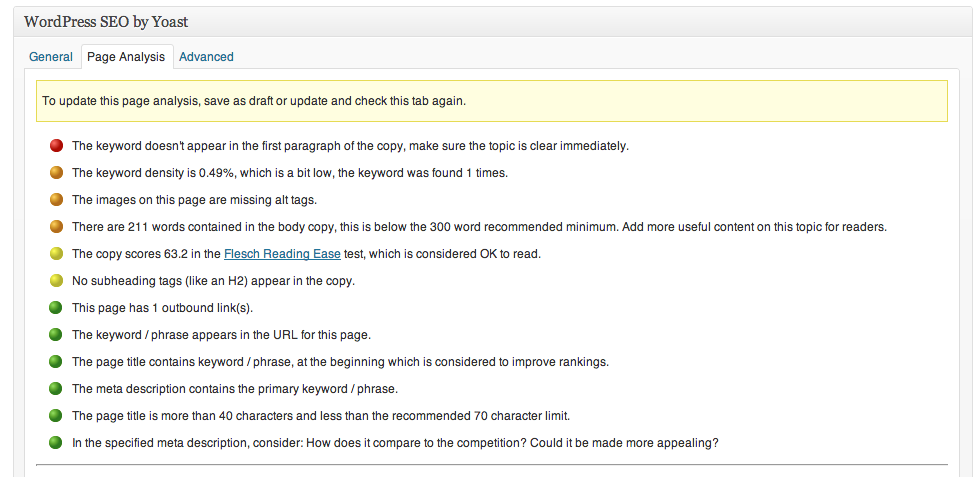
- Yoast SEO Plugin. Search engine traffic is going to play a big role in the success of your site. This is the best SEO plugin out there, and makes it extremely easy to see if your pages are optimized – even if you have no experience with SEO.
- Optin Skin – I’m increasingly convinced in the importance of an email list for niche sites. This is the best tool I’ve used for helping to build that list. It costs $67, but trust me, it’s well worth it.
- Google XML Sitemap – You want to make it as easy as possible for the search engine spiders to find and categorize your site.
How to Create a Content Plan that Works
When you’re trying to drive traffic to a niche site you can do so in two ways:
We’re going to be doing it the legit way, which in turn makes the content on your site a thousand times more important. We’re not just writing any content either, we’re being very deliberate as it has a couple specific goals we want to accomplish:
- Extremely Sharable – Because we’re not going to be doing a lot of spammy link building, we’re going to need to get links by you know, actually creating something people want to share. Brush up on your headline and copywriting skills, as this forms the basis for everything we create.
- Content that Sells – The end result of all of this is you need to get someone to buy something, so your content should help sell them on why they should do that.
- Ranks in Search Engines – You don’t want to write specifically for the computers, but like we mentioned above, you want to make it as easy on them as possible.
So, how do we accomplish this?
Well there are a few specific types of content that I’ve found works extremely well. Let’s go over what those are in detail.
Review Posts
One of the best ways to sell any product is to include an entire post that details how the product has had a personal effect on you. How did it improve your life? What can you do now that you couldn’t before? What were the legitimate downsides of the product?
All of these things help make a buyer’s decision much easier – this is especially true if you create a brand built around quality and trust.
At HDR Software I personally review every single product. I give my honest opinions, I compare them to one another, and I do my best to allow the user to have a solid choice about what’s best for them by the time they’re all done.
Detailed Tutorials Showcasing a Product
Just as important as review posts, are posts where people can learn a thing or to – after all your readers won’t always be in a buying mode, so you want to get them to come back on a fairly regular basis and build loyalty to your brand.
The best tutorial posts feature a product in one way or another.
For instance this post about
Black and White HDR Photography showcased a few different products that I use in order to create black and white HDR. It’s not only educating, but it’s playing up the abilities of the software – hopefully making people realize it could be a good asset to their photo arsenal.
If you get detailed enough, these are also the kinds of posts that could get picked up and syndicated by larger blogs in your industry.
List Posts About Your Niche
Bottom line, list posts are easy to read and easy to share. People love them, even if they often don’t provide as much in depth value as the previous two kinds of posts.
If there are a lot of products in your niche, you can potentially make these posts profitable by writing articles with titles like:
- 5 Best Point and Shoot Cameras for Low Light
- 3 Best Golf Shoes for Playing in the Rain
- 7 A/V Receivers That Will Make Your Neighbors Hate You
Posts like that are enticing, and if you do little mini reviews in them, you can generate some sales.
It’s also worth noting, not every single post has to be trying to sell something. Yes that’s the goal of the site, but you’re only going to make money by providing value, so make that the priority above all else.
Coupon Code Pages
This is less of a content post and totally an SEO play.
When you’re on a checkout page getting ready to buy, what’s the first thing you do when you see that little box that says “discount code”?
You Google “product name discount code” – or something similar.
With many affilaite programs instead of getting an affilaite link, you get an affilaite code.
The user enters in the code at check out, they get a discount and you get paid.
In addition to using your code in tutorials and review posts, you can create a page that walks people through exactly how to use the code.
Title the page “Product Name Discount Code” or some variation, and use some of your SEO resources to build a few links for that page. Often people will see it come up and see the coupon code in the title, and without even coming to your site you’ll get paid – because you gave them what they wanted, a discount.
Action Item: Start writing content based on these types of posts. Here’s a good plan to get started:
- Write 5 articles reviewing 5 of the most popular items in your niche
- Write 3 in depth tutorials on your niche (How to _______)
- Write 3 list posts
- Repeat
The Most Important Factor for Any Site
Bottom line, if no one comes to your site, you’re not gonna make any money (with the exception of the little tip above about coupon codes).
With the content strategies I’ve outlined, you’ll position yourself well, but in the beginning simply writing good content isn’t going to cut it.
Use the following strategies to help spread the word quickly and help you gain traction.
With a Little Help from Your Friends
Have any friends that do stuff on the internet? Great, give them a call or send them an email to let them know about your new project. You don’t want to be the dude that’s constantly inundating all your friends with pitches and favors, but don’t be afraid to let them know what you’re up to.
Often they’ll be able to do something small like give you a link on their site, or mention it via Facebook or Twitter. When you’re getting going anything helps, and it’s usually the people you’re already close to that will have the biggest impact towards getting on the right track.
If they have blogs see if you can write them a guest post. With almost every guest post I write I find a way to work a link back to my HDR site. It’s always relevant, but by doing this I’m not only building my blog, but my niche site as well.
List Out the Big Sites that Might Be Interested
Major blogs and news outlets are constantly looking for story ideas. When they are posting dozens of articles a day at times, editors love it when people come to them with good ideas and make their lives easier.
Make a list of all of the big web sites or blogs directly related to your niche and send the editors an email telling them about your latest post or story ideas.
Landing just one publication like this can be a total game changer for a small site.
HARO
Help a Reporter Out makes it even easier to find opportunities for press. You sign up for the topics you’re interested in and receive an email or two a day from reporters looking for stories.
Simple as that. This can help you position yourself as an expert on your topic, and potentially drive a lot of traffic to your new site.
Social Media
Facebook, Twitter, Pinterest – all of these can be huge drivers of traffic to a site. Provide unique content via each of these mediums, and develop a little mini-community around each of them.
The better you are at this, the more interested they will become when you’re sending them back to your site to see your latest post.
I’ve personally found Facebook to be the best for traffic. It’s easier to be seen and the ability to add a photo and longer caption to a post can be just enough to get people to click through more than say Twitter.
Email List
Once you’ve done all the basics, you can hop into “niche site 301″, and come up with an email gift for people. Maybe it’s a 4 part email series educating users on your niche, or perhaps it’s a full on pdf ebook that teaches them something useful.
Either way, giving people something of value for signing up to your email list is helping you to build a huge asset.
Like I said, traffic on our site dropped nearly 75% overnight. Had we been building an email list, we’d still have a way of communicating with our most loyal readers.
If you setup the list to send emails for every new post, you’ll also drive more traffic back to the site in the process.
Action Item: Do all the things listed above:
- Make a list of friends to contact about your new site – contact them.
- Make a list of larger blogs and publications you want to be featured in – contact as you begin creating content
- Sign up for HARO
- Register social media accounts and star posting
- Begin formulating ideas for your email list
A Quick Primer on SEO
So we talked all about how to build content that gets shared, leading to backlinks from others, which improves SEO, and ultimately makes you money.
In a perfect world, that’s all you need to do.
It isn’t always that simple however, and sometimes you just need a jump start.
This is one of the highest trafficked posts on this blog. It’s a full overview on SEO and is worth reviewing as you’re getting your site up and running.
Yoast SEO for WordPress
As we’ve mentioned above, you’ll want to grab
Yoast SEO for WordPress. It’s free, and it makes it as easy as possible to see if you’re optimized for a particular key term:

Yoast SEO Page Analysis Screen
Select your keyword, and use their handy system to see if the keyword is in all the right places. Once you’ve got a “green light” you know that post is in good shape from an on site perspective.
The Backlinking Strategy that Works
We want to do our SEO in the least spammy way possible – however with these sites, the vast majority of your traffic and income is going to come from the search engines. So in order to help facilitate that process, you might need a little kickstart.
He’s done a pretty good job of keeping this post up to date, but make sure you read the notes at the beginning of the article for the caveats.
This will help get you a good base, but it’s through high quality content, sharing, and larger media outlets that you’re really going to get the good links, traffic, and in turn money.
Action Item: Read both “How to Become an SEO Freelancer in 48 Hours” and “The Backlinking Strategy that Works” posts and begin implementing
Does This Process Really Work?
Well there you have it, this is exactly how to build a niche site in a non spammy way that will make you at least $500 a month.
Really? You might be asking “Is that all I have to do?”
That’s pretty much it. Don’t get me wrong though, you can sum up the process in 14 steps but it takes a lot of work and a lot of trial and error.
The main way you’re going to make consistent income is ranking highly in Google for buying key terms. Spend extra time doing the research to make sure you’re link building efforts aren’t wasted on terms that won’t have much monetary benefit.
If it takes a few months to start seeing rankings or even your first dollar – don’t get discouraged.
With every piece of content you create you’re opening up the door for someone to find you. This is not an overnight project – you’re in this for the long haul.
That said, if you’re willing to devote some time up front, in the end you’ll be rewarded with a business and asset that will make you relatively “passive income” for years to come.
Want to Go Even More In Depth?
This article tells you all you need to know in order to get started. But I’ve built an entire blueprint on affiliate marketing inside Location Rebel that will totally hold your hand if you want more help.
Want to know about the HUGE benefit of rich snippets? How about how to create an email campaign that sells? Google Authorship? The most up to date things I (and hundreds of others) have learned? 12 other detailed blueprints helping you build an online business?


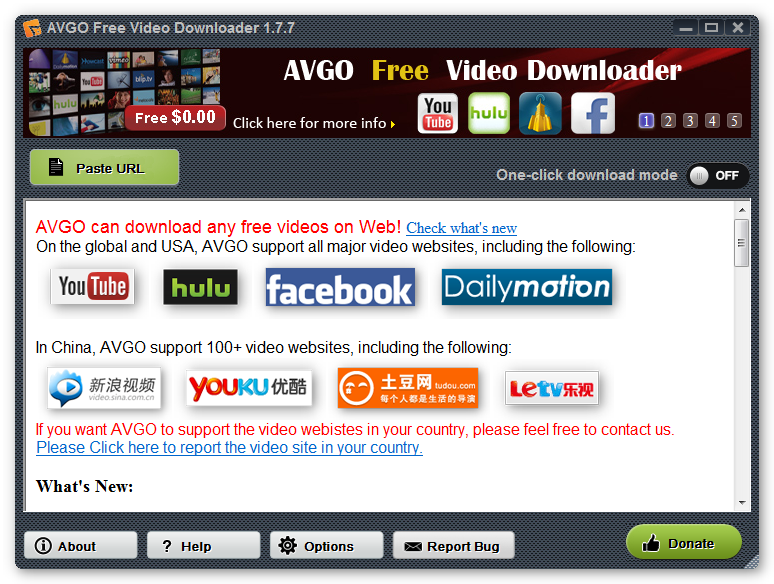
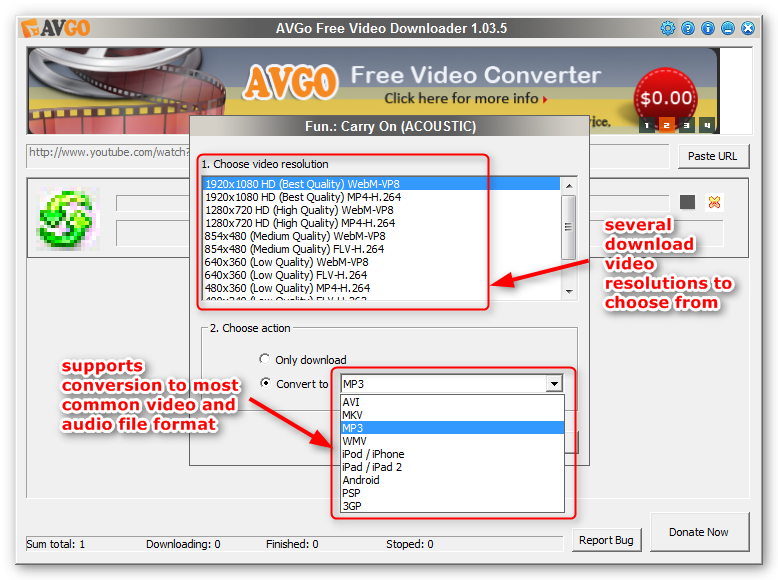 AVGO Free Video Downloader gives you the power to choose the video quality/resolution and format of the video you want to grab before you download it from YouTube, Dialymotion and Facebook, isn’t that great?